
Protobuf로 MCP 서버 구축하기 2부: protoc 플러그인으로 MCP 서버 자동 생성

작성자: EDB Korea Team
2025년 9월 21일
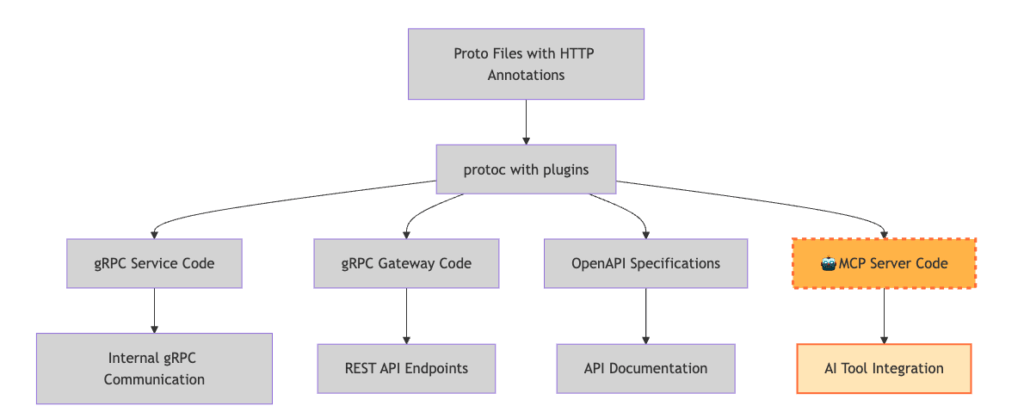
이 블로그 시리즈에서는 유용한 도구들로 가득 찬 MCP (Model Context Protocol) 서버를 구축하는 방법을 보여드립니다. 처음부터 시작하는 대신, 기존의 프로토콜 버퍼와 Google의 gRPC 트랜스코딩을 활용할 것입니다. 맞춤형 protoc (프로토콜 버퍼 컴파일러) 플러그인을 생성하여 MCP 서버를 자동으로 생성할 수 있습니다. 이 통합된 접근 방식을 통해 gRPC 서비스, OpenAPI 사양, REST API 및 MCP 서버를 모두 동일한 소스에서 생성할 수 있습니다.
이 블로그 시리즈는 4편으로 구성되어 있습니다
- 1부: gRPC 트랜스코딩을 사용하여 Protobuf에서 REST API 생성하기
- 2부: (본 기사) Protoc 플러그인으로 MCP 서버 생성 자동화하기
- 3부: Proto 주석으로 AI 상호작용 향상시키기
- 4부: 실제로 MCP 도구를 실행하면서 얻은 통찰력
Protobuf 기반 MCP 서버 자동화 구성 요소
이 튜토리얼을 마치면 다음을 갖게 됩니다:
- proto 파일에서 MCP 서버를 생성하는 맞춤형 protoc 플러그인
- 어떤 메서드가 MCP 도구가 될지 표시하는 맞춤형 어노테이션
- 하나의 소스에서 gRPC, REST, MCP 코드를 생성하는 완전한 파이프라인
- AI 에이전트가 상호작용할 수 있는 작동하는 MCP 서버
이 기사에 언급된 모든 코드는 GitHub 저장소 zhangcz828/proto-to-mcp-tutorial에서 찾을 수 있습니다.
전제 조건
시작하기 전에, 1부를 완료했으며 다음을 갖추고 있는지 확인하세요:
- 1부의 서점 튜토리얼 프로젝트
- Go 1.19+ 설치
- Protocol Buffer 컴파일러 (protoc) 설치
- Python 3.8+ 설치 (MCP 서버 런타임용)
- npx 설치
Protobuf 플러그인으로 MCP 서버를 자동 생성하는 이유
1부에서는 gRPC 트랜스코딩이 gRPC 및 REST API 정의를 통합하는 데 어떻게 도움이 되는지 보여드렸습니다. proto 파일에서 자동으로 생성된 깨끗하고 문서화가 잘 된 HTTP 엔드포인트를 갖게 되었죠. 하지만 곧 새로운 문제에 직면했습니다. Model Context Protocol을 통해 AI 시스템이 서비스와 상호작용하도록 만들고 싶었던 것입니다.
MCP는 AI 애플리케이션이 도구와 리소스에 프로그래밍 방식으로 접근하기 위한 표준화된 방법입니다. 우리의 통합된 접근 방식이 없었다면, 각 서비스에 대해 수동으로 MCP 서버 코드를 작성해야 했을 것입니다. 이는 기본적으로 gRPC 서비스, REST 엔드포인트 및 OpenAPI 사양과 함께 유지 관리해야 할 네 번째 API 정의 세트를 만드는 것과 같았습니다.
이때 우리는 protoc 기반 접근 방식을 확장할 수 있다는 것을 깨달았습니다. proto 파일에서 REST API와 OpenAPI 사양을 생성할 수 있다면, MCP 서버도 생성할 수 있지 않을까요? REST 엔드포인트 생성을 안내했던 동일한 HTTP 어노테이션이 MCP 도구를 구조화하는 방법을 알려줄 수 있었습니다.
Protobuf MCP 서버 프로젝트 설정
1부의 튜토리얼 프로젝트를 확장하는 것부터 시작하겠습니다. 튜토리얼 디렉토리로 돌아가 다음 명령을 실행하세요:
cd proto-to-mcp-tutorial
# 플러그인 및 MCP 코드용 디렉토리 생성
mkdir -p plugins/protoc-gen-mcp
mkdir -p generated/mcp
mkdir -p google/protobuf
mkdir -p mcp/protobuf
프로젝트 구조는 이제 MCP 관련 디렉토리가 추가되어 다음과 같아야 합니다:
proto-to-mcp-tutorial
├── cmd
│   └── server
│       └── main.go
├── generate.sh
├── generated
│   ├── go
│   │   ├── bookstore_grpc.pb.go
│   │   ├── bookstore.pb.go
│   │   └── bookstore.pb.gw.go
│   ├── mcp                # New
│   └── openapi
│       └── openapi.yaml
├── go.mod
├── go.sum
├── google
│   └── protobuf          # New
├── mcp                   # New
│   └── protobuf
├── googleapis
│   └── google
│       └── api
│           ├── annotations.proto
│           └── http.proto
├── plugins               # New
│   └── protoc-gen-mcp
├── proto
│   └── bookstore.proto
└── README.md
MCP 도구 지정을 위한 맞춤형 어노테이션 생성
1. 필수 proto 파일 다운로드
curl -o google/protobuf/descriptor.proto \
https://raw.githubusercontent.com/protocolbuffers/protobuf/refs/heads/main/src/google/protobuf/descriptor.proto
2. MCP 어노테이션 정의
어떤 RPC 메서드가 MCP 도구가 되어야 하는지 표시하기 위해 맞춤형 어노테이션을 생성해야 합니다. 새 파일 mcp/protobuf/annotations.proto를 생성합니다:
syntax = "proto3";

package example.v1;

option go_package = "proto-to-mcp-tutorial/generated/go/mcp;mcp";

import "google/protobuf/descriptor.proto";

// 메서드를 MCP 도구로 표시하기 위한 맞춤 확장 (50003은 사용자 지정 확장 필드 번호)
extend google.protobuf.MethodOptions {
 MCPOptions mcp = 50003;
}

message MCPOptions {
 // 이 메서드가 MCP 도구로 노출되어야 하는지 여부
 bool enabled = 1;
}
3. MCP 어노테이션용 Go 코드 생성
export GOOGLEAPIS_DIR=./googleapis
export MCP_DIR=.
protoc -I${GOOGLEAPIS_DIR} -I${MCP_DIR} --go_out=./generated/go --go_opt=paths=source_relative mcp/protobuf/annotations.proto
MCP 어노테이션으로 Bookstore Proto 파일 업데이트
이제 proto/bookstore.proto 파일에 MCP 어노테이션을 추가하여 어떤 메서드를 MCP 도구로 활성화할지 표시합니다.
syntax = "proto3";
package bookstore.v1;
import "google/api/annotations.proto";
import "mcp/protobuf/annotations.proto";

option go_package = "generated/go/bookstore/v1";

service BookstoreService {
  // Get a book by ID
  rpc GetBook(GetBookRequest) returns (Book) {
    option (google.api.http) = {
      get: "/v1/books/{book_id}"
    };
    option (mcp.v1.tool) = {
      enabled: true
    };
  }

  // Create a new book
  rpc CreateBook(CreateBookRequest) returns (Book) {
    option (google.api.http) = {
      post: "/v1/books"
      body: "book"
    };
    option (mcp.v1.tool) = {
      enabled: true
    };
  }
}

message Book {
  string book_id = 1;
  string title = 2;
  string author = 3;
  int32 pages = 4;
}

message GetBookRequest {
  // The ID of the book to retrieve
  string book_id = 1;
}

message CreateBookRequest {
  // The book object to create
  Book book = 1;
}
protoc-gen-mcp 플러그인 구축
plugins/protoc-gen-mcp/main.go 파일에 맞춤형 protoc 플러그인 코드를 작성합니다. 이 Go 플러그인은 proto 파일을 구문 분석하고, MCP 어노테이션을 확인한 다음, Python MCP 서버 코드를 생성합니다.
package main

import (
	"bytes"
	"fmt"
	"regexp"
	"strings"
	"text/template"

	"google.golang.org/protobuf/compiler/protogen"
	"google.golang.org/protobuf/proto"
	"google.golang.org/protobuf/reflect/protoreflect"
	"google.golang.org/protobuf/types/descriptorpb"
	"google.golang.org/protobuf/types/pluginpb"

	mcpannotations "proto-to-mcp-tutorial/generated/go/mcp/protobuf"

	httpannotations "google.golang.org/genproto/googleapis/api/annotations"
)

func main() {
	protogen.Options{}.Run(func(gen *protogen.Plugin) error {
		gen.SupportedFeatures = uint64(pluginpb.CodeGeneratorResponse_FEATURE_PROTO3_OPTIONAL)

		// Extract MCP methods from the proto files
		mcpMethods := extractMCPMethods(gen)

		if len(mcpMethods) == 0 {
			return nil // No MCP methods found
		}

		// Generate main server file
		generateMCPServer(gen, mcpMethods)

		return nil
	})
}

type MCPMethod struct {
	Service     *protogen.Service
	Method      *protogen.Method
	ToolName    string
	Description string
	HTTPInfo    *HTTPInfo
	Input       *protogen.Message
	Output      *protogen.Message
	Parameters  []*MCPParameter
}

type MCPParameter struct {
	Name        string
	Type        string
	Required    bool
	Description string
}

type HTTPInfo struct {
	Method string
	Path   string
	Body   string
}

func extractMCPMethods(gen *protogen.Plugin) []*MCPMethod {
	var mcpMethods []*MCPMethod

	for _, file := range gen.Files {
		if !file.Generate {
			continue
		}

		for _, service := range file.Services {
			for _, method := range service.Methods {
				if hasMCPToolAnnotation(method) {
					mcpMethod := &MCPMethod{
						Service:     service,
						Method:      method,
						ToolName:    generateToolName(method),
						Description: extractDescription(method),
						HTTPInfo:    extractHTTPInfo(method),
						Input:       method.Input,
						Output:      method.Output,
						Parameters:  extractParameters(method.Input),
					}
					mcpMethods = append(mcpMethods, mcpMethod)
				}
			}
		}
	}

	return mcpMethods
}

func hasMCPToolAnnotation(method *protogen.Method) bool {
	options := method.Desc.Options().(*descriptorpb.MethodOptions)
	if options == nil {
		return false
	}

	// Check if method has mcp.v1.tool annotation
	if !proto.HasExtension(options, mcpannotations.E_Tool) {
		return false
	}

	// Get annotation value and check if enabled
	toolOptions := proto.GetExtension(options, mcpannotations.E_Tool).(*mcpannotations.MCPToolOptions)
	return toolOptions != nil && toolOptions.Enabled
}

func extractParameters(inputType *protogen.Message) []*MCPParameter {
	var parameters []*MCPParameter

	if inputType != nil {
		for _, field := range inputType.Fields {
			param := &MCPParameter{
				Name:        string(field.Desc.Name()),
				Type:        getFieldType(field),
				Required:    isFieldRequired(field),
				Description: extractFieldDescription(field),
			}
			parameters = append(parameters, param)
		}
	}

	return parameters
}

func isFieldRequired(field *protogen.Field) bool {
	// In proto3, technically all fields are optional, but for business logic:
	// If the field not marked as optional keyword, consider it required
	if field.Desc.HasOptionalKeyword() {
		return false
	}

	return true
}

func getFieldType(field *protogen.Field) string {
	// Check if the field is repeated (array/list)
	if field.Desc.Cardinality() == protoreflect.Repeated {
		return "list"
	}

	switch field.Desc.Kind() {
	case protoreflect.StringKind:
		return "string"
	case protoreflect.Int32Kind, protoreflect.Int64Kind:
		return "integer"
	case protoreflect.BoolKind:
		return "boolean"
	case protoreflect.MessageKind:
		return "object"
	case protoreflect.EnumKind:
		return "string"
	default:
		return "string"
	}
}

func extractFieldDescription(field *protogen.Field) string {
	if field.Comments.Leading != "" {
		return strings.TrimSpace(string(field.Comments.Leading))
	}
	return ""
}

func generateToolName(method *protogen.Method) string {
	methodName := string(method.Desc.Name())

	// Convert to snake_case
	methodName = camelToSnake(methodName)

	return methodName
}

func camelToSnake(str string) string {
	re := regexp.MustCompile("([a-z0-9])([A-Z])")
	snake := re.ReplaceAllString(str, "${1}_${2}")
	return strings.ToLower(snake)
}

func extractDescription(method *protogen.Method) string {
	if method.Comments.Leading != "" {
		return strings.TrimSpace(string(method.Comments.Leading))
	}
	return fmt.Sprintf("Execute %s RPC method", method.Desc.Name())
}

func extractHTTPInfo(method *protogen.Method) *HTTPInfo {
	options := method.Desc.Options().(*descriptorpb.MethodOptions)
	if options == nil {
		return nil
	}

	if !proto.HasExtension(options, httpannotations.E_Http) {
		return nil
	}

	httpRule := proto.GetExtension(options, httpannotations.E_Http).(*httpannotations.HttpRule)
	if httpRule == nil {
		return nil
	}

	info := &HTTPInfo{}

	switch pattern := httpRule.Pattern.(type) {
	case *httpannotations.HttpRule_Get:
		info.Method = "GET"
		info.Path = pattern.Get
	case *httpannotations.HttpRule_Post:
		info.Method = "POST"
		info.Path = pattern.Post
		info.Body = httpRule.Body
	case *httpannotations.HttpRule_Put:
		info.Method = "PUT"
		info.Path = pattern.Put
		info.Body = httpRule.Body
	case *httpannotations.HttpRule_Delete:
		info.Method = "DELETE"
		info.Path = pattern.Delete
	case *httpannotations.HttpRule_Patch:
		info.Method = "PATCH"
		info.Path = pattern.Patch
		info.Body = httpRule.Body
	}

	return info
}

func generateMCPServer(gen *protogen.Plugin, mcpMethods []*MCPMethod) {
	outputFile := gen.NewGeneratedFile("mcp_server.py", ".")

	funcMap := template.FuncMap{
		"contains": func(s, substr string) bool {
			return strings.Contains(s, substr)
		},
		"printf": fmt.Sprintf,
		"indent": func(text string, spaces int) string {
			if text == "" {
				return text
			}
			lines := strings.Split(text, "\n")
			indentStr := strings.Repeat(" ", spaces)
			var result []string
			for i, line := range lines {
				if strings.TrimSpace(line) != "" {
					result = append(result, indentStr+line)
				} else if i < len(lines)-1 { // Keep empty lines except the last one
					result = append(result, "")
				}
			}
			return strings.Join(result, "\n")
		},
	}

	tmpl := template.Must(template.New("mcp_server").Funcs(funcMap).Parse(mcpServerTemplate))

	var buf bytes.Buffer
	if err := tmpl.Execute(&buf, mcpMethods); err != nil {
		return
	}

	outputFile.P(buf.String())
}

const mcpServerTemplate = `#!/usr/bin/env python3
"""
MCP Server for UPM API - Auto-generated from Protocol Buffers

This server provides access to project management operations
through the Model Context Protocol.
"""

import os
import sys
from typing import Any
import json

import httpx
from mcp.server.fastmcp import FastMCP

API_BASE = 'http://localhost:8080'
VERIFY_SSL = False

# Initialize FastMCP
mcp = FastMCP('Bookstore Server')

async def make_api_request(url: str, method: str = "GET", payload: dict = None) -> dict[str, Any] | None:
    """Make a HTTP request to the specified URL."""

    headers = {
        "Content-Type": "application/json",
    }
    # Use SSL verification based on environment variable
    async with httpx.AsyncClient(verify=VERIFY_SSL) as client:
        try:
            if method.upper() == "GET":
                response = await client.get(url, headers=headers, timeout=30.0)
            elif method.upper() == "PUT":
                response = await client.put(url, headers=headers, json=payload, timeout=30.0)
            elif method.upper() == "POST":
                response = await client.post(url, headers=headers, json=payload, timeout=30.0)
            elif method.upper() == "DELETE":
                response = await client.delete(url, headers=headers, timeout=30.0)
            elif method.upper() == "PATCH":
                response = await client.patch(url, headers=headers, json=payload, timeout=30.0)
            else:
                return {"error": f"Unsupported HTTP method: {method}"}

            response.raise_for_status()

            # Handle DELETE responses that might be empty
            if method.upper() == "DELETE":
                if response.status_code == 200 or response.status_code == 204:
                    return {"success": True, "message": "Resource deleted successfully"}

            # Try to parse JSON, return empty dict if no content
            try:
                return response.json()
            except:
                return {"success": True}

        except httpx.HTTPStatusError as e:
            return {"error": f"HTTP {e.response.status_code}: {e.response.text}"}
        except Exception as e:
            return {"error": str(e)}

# MCP Tools

{{range .}}
@mcp.tool()
async def {{.ToolName}}({{range $i, $param := .Parameters}}{{if $i}}, {{end}}{{$param.Name}}: {{if eq $param.Type "string"}}str{{else if eq $param.Type "integer"}}int{{else if eq $param.Type "boolean"}}bool{{else if eq $param.Type "list"}}list{{else}}dict{{end}}{{if not $param.Required}} = None{{end}}{{end}}) -> str:
    """{{.Description}}
    {{if .HTTPInfo}}
    HTTP: {{.HTTPInfo.Method}} {{.HTTPInfo.Path}}{{end}}

    Parameters:{{range .Parameters}}
    - {{.Name}} ({{.Type}}{{if not .Required}}, optional{{end}}): {{if contains .Description "\n"}}{{indent .Description 6}}{{else}}{{.Description}}{{end}}{{end}}

    Returns:
    - str: JSON formatted response from the API containing the result or error information
    """
    try:
        {{if .HTTPInfo}}
        # Construct the URL
        url = f"{API_BASE}{{.HTTPInfo.Path}}"
        {{$httpInfo := .HTTPInfo}}{{range .Parameters}}{{if and .Required (contains $httpInfo.Path (printf "{%s}" .Name))}}
        url = url.replace("{" + "{{.Name}}" + "}", str({{.Name}})){{end}}{{end}}

        # Prepare payload for non-GET requests
        payload = {}
        {{range .Parameters}}{{if and (ne $httpInfo.Method "GET") (ne $httpInfo.Method "DELETE") (not (contains $httpInfo.Path (printf "{%s}" .Name)))}}
        {{if .Required}}payload["{{.Name}}"] = {{.Name}}{{else}}if {{.Name}} is not None:
            payload["{{.Name}}"] = {{.Name}}{{end}}{{end}}{{end}}

        # Make the API request
        result = await make_api_request(url, "{{.HTTPInfo.Method}}", payload if payload else None)
        {{else}}
        result = {"error": "No HTTP endpoint defined for this method"}{{end}}

        # Return formatted JSON response
        import json
        return json.dumps(result, indent=2)

    except Exception as e:
        # Handle any errors that occur during execution
        import json
        error_result = {
            "error": f"Tool execution failed: {str(e)}",
            "tool_name": "{{.ToolName}}",
            "error_type": type(e).__name__
        }
        return json.dumps(error_result, indent=2)

{{end}}
if __name__ == '__main__':
    # Run the MCP server
    mcp.run()
`
플러그인 컴파일
# 프로젝트 루트 경로에서 실행
go build -o protoc-gen-mcp plugins/protoc-gen-mcp/main.go
gRPC·REST·OpenAPI·MCP 코드 통합 생성
generate.sh 스크립트를 업데이트하여 MCP 서버 생성 단계를 포함합니다.
#!/bin/bash

export GOOGLEAPIS_DIR=./googleapis
export MCP_DIR=.

echo "Checking for required protoc plugins..."

# Check if protoc-gen-go is available
if ! command -v protoc-gen-go &> /dev/null; then
    echo "❌ protoc-gen-go not found. Installing..."
    go install google.golang.org/protobuf/cmd/protoc-gen-go@latest
    if [ $? -ne 0 ]; then
        echo "⚠️  Failed to install protoc-gen-go. Skipping Go generation."
        exit 1
    fi
fi

# Check if protoc-gen-go-grpc is available
if ! command -v protoc-gen-go-grpc &> /dev/null; then
    echo "❌ protoc-gen-go-grpc not found. Installing..."
    go install google.golang.org/grpc/cmd/protoc-gen-go-grpc@latest
    if [ $? -ne 0 ]; then
        echo "⚠️  Failed to install protoc-gen-go-grpc. Skipping gRPC generation."
        exit 1
    fi
fi

# Check if protoc-gen-grpc-gateway is available
if ! command -v protoc-gen-grpc-gateway &> /dev/null; then
    echo "❌ protoc-gen-grpc-gateway not found. Installing..."
    go install github.com/grpc-ecosystem/grpc-gateway/v2/protoc-gen-grpc-gateway@latest
    if [ $? -ne 0 ]; then
        echo "⚠️  Failed to install protoc-gen-grpc-gateway. Skipping Gateway generation."
        exit 1
    fi
fi


echo "🔧 Generating Go gRPC code..."

# Step 1: Generate Go code for MCP annotations
echo "🔧 Generating MCP annotations Go code..."
protoc -I${GOOGLEAPIS_DIR} -I${MCP_DIR} --go_out=./generated/go --go_opt=paths=source_relative mcp/protobuf/annotations.proto

# Step 2: Generate Go gRPC code
protoc -I${GOOGLEAPIS_DIR} -I${MCP_DIR} --proto_path=proto --go_out=./generated/go  --go_opt paths=source_relative --go-grpc_out=./generated/go --go-grpc_opt paths=source_relative bookstore.proto


# Generate gRPC Gateway for REST endpoints
echo "🔧 Generating gRPC Gateway..."
protoc -I${GOOGLEAPIS_DIR} -I${MCP_DIR} --proto_path=proto --grpc-gateway_out=./generated/go --grpc-gateway_opt paths=source_relative bookstore.proto

# Generate OpenAPI specifications
echo "🔧 Generating OpenAPI spec..."
protoc -I${GOOGLEAPIS_DIR} -I${MCP_DIR} -I./proto --openapi_out=./generated/openapi \
      --openapi_opt=fq_schema_naming=true \
      --openapi_opt=version="1.0.0" \
      --openapi_opt=title="Bookstore API" \
      bookstore.proto

# Generate MCP server (always available since we have our custom plugin)
echo "🔧 Generating MCP server..."
protoc -I${GOOGLEAPIS_DIR} -I${MCP_DIR} --proto_path=proto \
      --plugin=protoc-gen-mcp=./protoc-gen-mcp \
      --mcp_out=./generated/mcp \
      bookstore.proto

echo ""
echo "🎉 Generation complete!"
echo "📁 Check the ./generated directory for all generated files."
업데이트된 생성 스크립트를 실행합니다:
./generate.sh
아래와 같은 결과값을 볼 수 있습니다:
Checking for required protoc plugins...🔧 Generating Go gRPC code...🔧 Generating MCP annotations Go code...🔧 Generating gRPC Gateway...🔧 Generating OpenAPI spec...🔧 Generating MCP server...🎉 Generation complete!📁 Check the ./generated directory for all generated files.
생성된 MCP 서버 실행 및 테스트
1. Go 서버 시작 (터미널 1)
터미널 1에서 다음 명령을 실행하여 (1부에서 구축한) Go 서버를 시작합니다. 이 서버는 gRPC 서비스와 REST 게이트웨이 역할을 모두 수행합니다.
2. MCP 서버 설정 및 시작 (터미널 2)
uv (Python 패키지 관리자)를 설치한 후, 환경을 설정하고 MCP 서버를 시작합니다:
# Create Python virtual environmentuv venvsource .venv/bin/activate# Install MCP server dependenciesuv pip install fastmcp httpx --native-tls# Start MCP Inspectornpx @modelcontextprotocol/inspector \uv \--directory ./generated/mcp \run \mcp_server.py
3. MCP 도구 목록 테스트
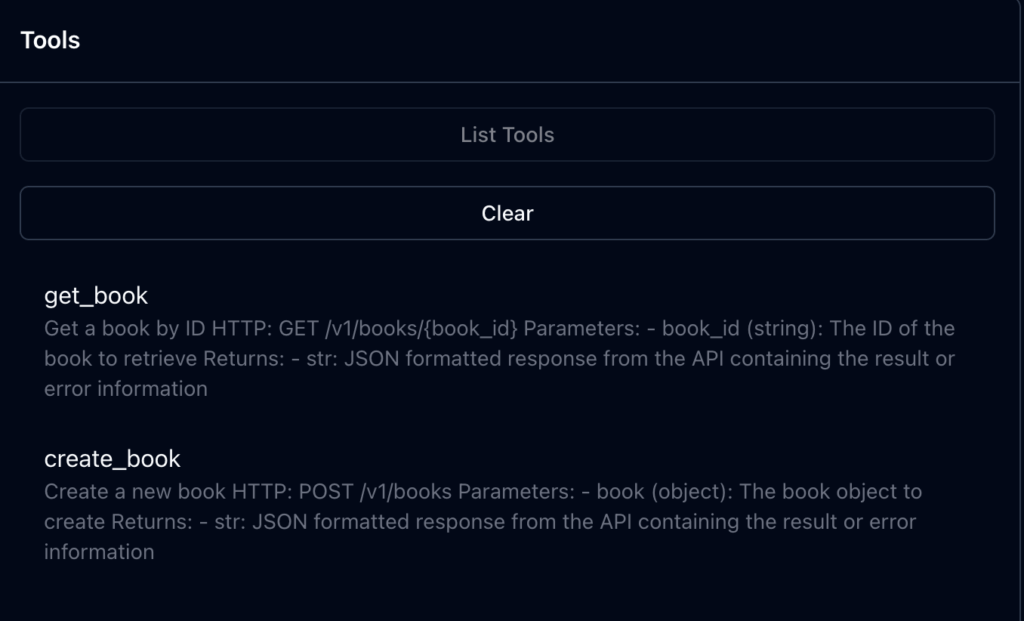
열린 MCP Inspector UI 페이지에서 연결한 다음 모든 도구를 나열하면, get_book과 create_book 두 가지 도구가 표시되어야 합니다.
4. 도구 실행 테스트
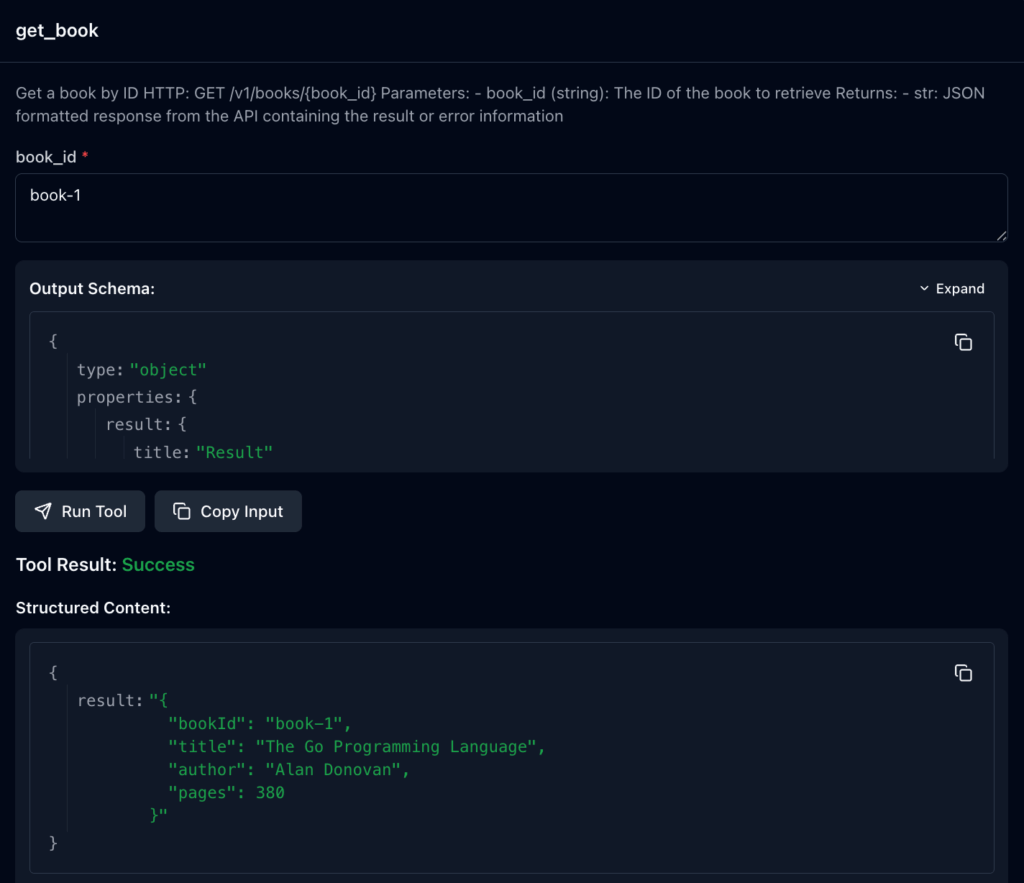
get_book 도구를 선택하고, book_id에 book-1을 입력하고 실행합니다. 이는 curl -X GET http://localhost:8080/v1/books/book-1과 동일한 결과를 반환해야 합니다.
Protobuf 기반 MCP 서버 자동 생성 결과
이제 하나의 proto 파일이 세 가지 다른 인터페이스를 생성하는 완전한 파이프라인을 갖게 되었습니다:
# Test gRPC interfacegrpcurl -plaintext -d '{"book_id": "book-1"}' localhost:9090 bookstore.v1.BookstoreService/GetBook# Test REST interface curl http://localhost:8080/v1/books/book-1# Test MCP interface (as shown above)
세 가지 모두 동일한 북 데이터를 반환해야 합니다!
동일한 proto 파일에 이제 gRPC 서비스, REST 엔드포인트, OpenAPI 사양 및 MCP 도구를 생성하는 데 필요한 모든 것이 포함되어 있습니다.
다음 단계: Proto 주석으로 AI 상호작용 개선
생성된 MCP 도구를 AI 에이전트로 테스트하기 시작했을 때, 작동하는 도구만으로는 충분하지 않다는 중요한 사실을 빠르게 깨달았습니다. AI 에이전트는 각 도구가 무엇을 하는지, 언제 적절하게 사용해야 하는지 이해하기 위해 풍부하고 상세한 설명이 필요합니다. 3부에서는 proto 주석이 AI 상호작용을 안내하는 지능적인 MCP 도구 문서가 되는 방법을 보여줄 것입니다.
Protobuf 기반 MCP 서버 자동 생성 FAQ
protoc 플러그인으로 MCP 서버를 자동 생성하는 이유는 무엇인가요?
gRPC 서비스, REST 엔드포인트, OpenAPI 사양과 MCP 서버를 각각 관리하면 API 정의가 중복됩니다. 맞춤형 protoc 플러그인을 사용하면 동일한 proto 파일을 기준으로 MCP 서버 코드를 생성해 하나의 소스에서 여러 인터페이스를 관리할 수 있습니다.
어떤 RPC 메서드가 MCP 도구로 생성되나요?
이 튜토리얼에서는 맞춤형 MCP 어노테이션을 활성화한 RPC 메서드만 MCP 도구로 추출합니다. 플러그인은 해당 어노테이션과 HTTP 정보를 확인해 도구 이름, 매개변수, 설명, 요청 방식을 구성합니다.
생성된 MCP 서버는 REST API와 어떻게 통신하나요?
생성된 Python MCP 서버는 httpx를 사용해 proto의 HTTP 어노테이션에서 얻은 REST 엔드포인트를 호출합니다. GET, POST, PUT, DELETE, PATCH 요청을 처리하고 응답을 JSON 형식으로 반환합니다.
이 튜토리얼을 실행하려면 무엇이 필요한가요?
1부의 서점 튜토리얼 프로젝트와 함께 Go 1.19 이상, Protocol Buffer 컴파일러(protoc), Python 3.8 이상, npx가 필요합니다. 생성된 MCP 서버 테스트 단계에서는 uv, fastmcp, httpx, MCP Inspector를 사용합니다.
MCP 서버가 생성되었는지 어떻게 확인하나요?
generate.sh를 실행한 뒤 MCP Inspector에서 서버에 연결하고 도구 목록을 확인합니다. 이 예제에서는 get_book과 create_book이 표시되며, get_book 실행 결과를 동일한 REST API 호출 결과와 비교할 수 있습니다.